


Introduction :
Every successful cyber attack begins long before the first exploit is launched. It starts with reconnaissance the methodical process of gathering information about a target This phase is so critical that professional penetration testers often spend 60–70% of their time just collecting data before attempting any actual hacking.
In this article, I’ll walk you through the techniques ethical hackers and bug bounty hunters use to discover vulnerabilities in organizations. Whether you’re a developer wanting to secure your applications, a security enthusiast, or someone curious about how hackers think, this guide will change how you view digital security.
“Give me six hours to chop down a tree, and I will spend the first four sharpening the axe” Abraham Lincoln
This quote perfectly captures the hacker mindset Reconnaissance is sharpening the axe
The Two Types of Reconnaissance :
1 ) Passive Reconnaissance
Passive recon involves gathering information without directly interacting with the target. Think of it as observing from a distance the target never knows you’re looking
Examples include:
- Searching public records and databases
- Analyzing social media profiles
- Reading job postings (they reveal tech stacks!)
- Using search engines creatively
- Examining DNS records
2 ) Active Reconnaissance
Active recon requires direct interaction with the target’s systems. This leaves traces and could be detected by security monitoring
Examples include:
- Port scanning
- Web crawling
- Subdomain enumeration
- Vulnerability scanning
Let’s dive into the specific techniques.
Subdomain Enumeration : Finding Hidden Doors
Most security teams focus on protecting their main domain, but forget about the dozens (or hundreds) of subdomains hiding in the shadows. These forgotten subdomains often run outdated software, contain sensitive data, or have weaker security controls.
Why Subdomains Matter
Consider this :
staging.company.com : might run an older, unpatched version of the application
dev.company.com : might have debug mode enabled.
old.company.com : might be a forgotten server from 2019 that nobody maintains
I’ve personally found :
- Admin panels at company like : admin.target.com with default credentials
Tools of the Trade
Subfinder : My go to tool for passive subdomain enumeration :
subfinder -d target.com -o subdomains.txtAmass : More comprehensive but slower :
amass enum -passive -d target.comCertificate Transparency Logs : SSL certificates are public Check crt.sh :
https://crt.sh/?q=%.target.comPro Tip
Combine multiple tools and deduplicate. Each tool has different sources, and combining them gives you the most complete picture :
cat subfinder.txt amass.txt crtsh.txt | sort -u > all_subdomains.txtGoogle Dorking : The Search Engine as a Weapon
Google indexes more than you think. Using advanced search operators, hackers can find sensitive files, exposed admin panels, and vulnerable servers all through Google.
Dangerous Dorks
>>>>> Find exposed configuration files :
site:target.com filetype:envsite:target.com filetype:yml passwordsite:target.com filetype:config
>>>>> Find login panels :
site:target.com inurl:adminsite:target.com inurl:loginsite:target.com intitle:"Dashboard"
>>>>> Find exposed documents :
site:target.com filetype:pdf confidentialsite:target.com filetype:xlsxsite:target.com filetype:doc internal
>>>>> Find error messages (reveals technology) :
site:target.com "sql syntax error"site:target.com "php error"site:target.com "stack trace"The Google Hacking Database
The [GHDB] maintains thousands of proven Google dorks for finding vulnerabilities. It’s terrifying how much sensitive data is just… indexed.
Defense Tip
Use robots.txt properly, implement authentication on sensitive pages, and regularly Google your own domain with these dorks. You might be surprised what you find
Technology Fingerprinting: Know Your Enemy
Understanding what technologies a target uses is crucial. Each technology has its own set of known vulnerabilities.
What to Look For
- Web servers : Apache, Nginx, IIS
- Frameworks : React, Angular, Laravel, Django
- CMS : WordPress, Drupal, Joomla
- Databases: Exposed by error messages
- Cloud providers: AWS, Azure, GCP
- WAFs : Cloudflare, Akamai, AWS WAF
Detection Methods
HTTP Headers reveal a lot :
Server: nginx/1.18.0X-Powered-By: PHP/7.4.3X-AspNet-Version: 4.0.30319Wappalyzer : Browser extension that identifies technologies instantly.
WhatWeb : Command line alternative:
whatweb target.comBuilt With : Online service showing technology stack
Why This Matters
If I know you’re running WordPress 5.4.1, I can immediately search for CVEs affecting that version. If I see you’re using an old PHP version, I know to look for type juggling vulnerabilities.
The Wayback Machine: Ghosts of Websites Past
The Internet Archive’s Wayback Machine is a goldmine for hackers. It stores historical snapshots of websites, including:
- Old pages that were removed (but might still exist)
- Previous versions of JavaScript files (with hardcoded API keys)
- Removed endpoints that are still functional
- Old documentation revealing internal systems
How to Use It
Web Interface :
https://web.archive.org/web/*/target.com/*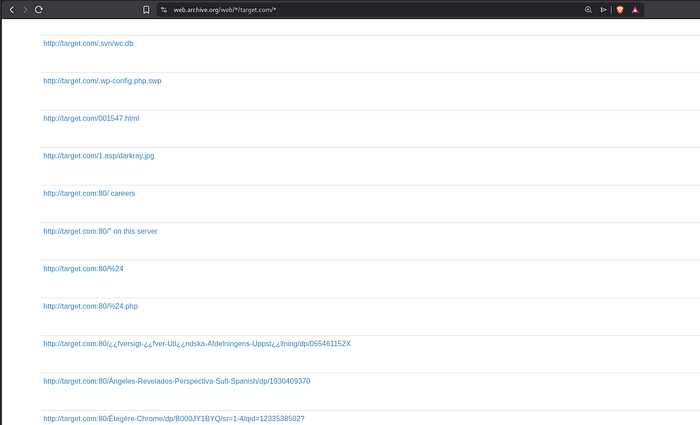
Command Line with waybackurls :
echo target.com | waybackurls > urls.txtDefense Tip
When deprecating endpoints, actually remove them from your server. Don’t just hide the links.
See you in the next part